 Experience Works
Hunger and saturation previews
Shows food values for vanilla and modded items without changing their effects. Food is read from its Minecraft food component, so other mods’ foods work too. Lunch Bags/Lunchboxes preview the next food they would consume.
- Hold food in either hand, or hover food in an inventory: green highlights predict restored hunger; green additions to outlined gold pips predict added saturation, capped by the resulting hunger level.
- Shaded gold pips under the hunger icons show current saturation. The thin rust-coloured line below shows exhaustion toward its next 4-point drain.
- Hover food for a compact two-row card with vanilla hunger icons, shaded saturation pips and exact restoration numbers. This food card stays visible without Shift; Shift expands the item’s other details.
Saturation and exhaustion are synchronized from the server every 10 ticks (half a second). Food previews are hidden in Creative, Spectator, while mounted and with the HUD hidden. They automatically disable when AppleSkin is installed to avoid duplicate overlays.
Disable with feature.food_previews=false in the normal module/content config. This is informational and has no recipe, XP cost or equipment requirement.
HUD/preview calculations · Server synchronization. Reference feature set: AppleSkin project.
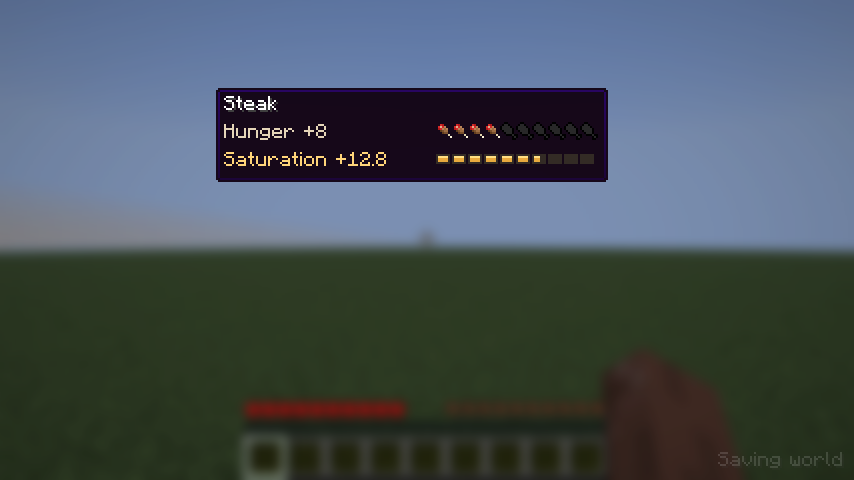
Native food tooltip with hunger icons, saturation pips and exact values. Captured in game on 23 November 2026.
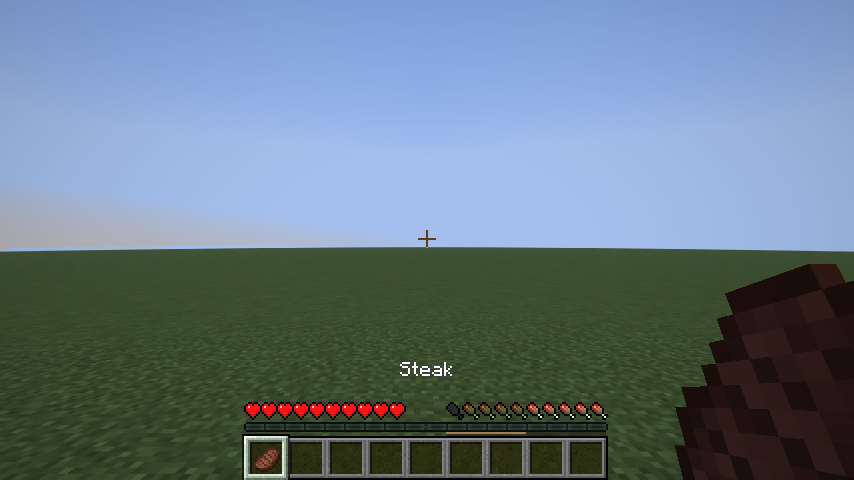
Held steak previews hunger restoration and saturation above the hotbar.