 Experience Works
Backpack Module

Adds storage to a cybernetic chestpiece, including one fitted over armour. One reusable module works with every tier. Its inventory icon is a gunmetal cartridge with a brown backpack symbol.
| Chestpiece | Storage |
|---|---|
| Infused | 8 slots |
| Energised | 16 slots |
| Emblazoned | 24 slots |
| Enderic | 32 slots |
Press B, remappable under Experience Works portable controls, to open the worn backpack. The key also works in inventory screens when a text field is not focused. Normal clicks and Shift-clicks move real stacks. There is no XP fee.
Craft with 7 leather, 1 Energised Gold Ingot and 1 chest:
L G L
L C L
L L L
Install by clicking a compatible chestpiece with the module on your cursor, or craft it with a standalone chestpiece. Hover the chestpiece, scroll to the Backpack Module and right-click with an empty cursor to remove it. The removed module retains its contents and cannot be installed into a tier that lacks space for its occupied slots. Fit/recover the shell through crafting as usual; storage transfers with it.
Bags, bundles, cybernetic equipment, other modules and items carrying container data cannot be nested inside the backpack. An equipped backpack is opened from the chest slot; a removed module retains storage until reinstalled.
Recipe · Inventory and capacities · Removal/storage transfer.
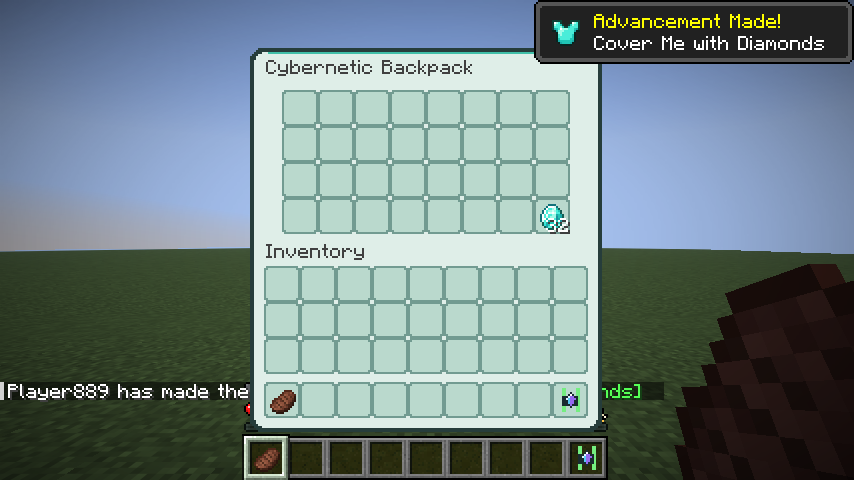
In-game screenshot: the 32-slot Enderic backpack, with stored diamonds retained after module and armour transfers.