 Experience Works
Explorer’s Compass
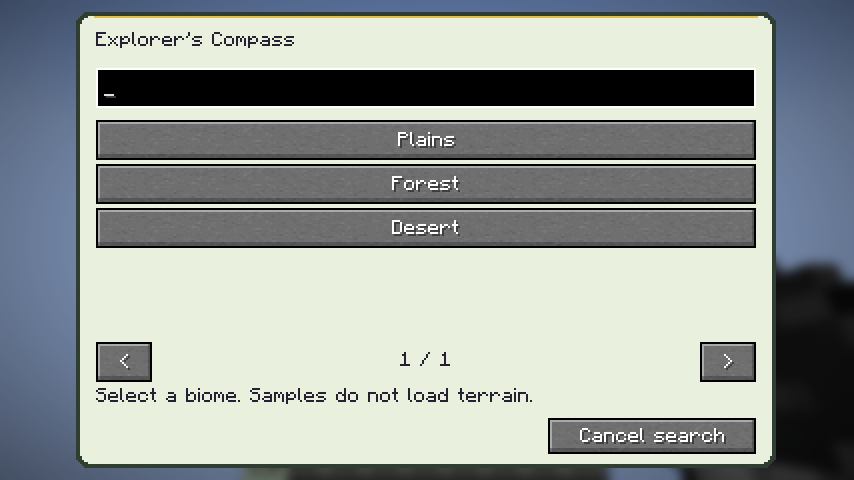
Right-click to choose a biome from those available in the current dimension. Search by biome name/ID, or @namespace. Keep the same compass held while it searches; moving it out of your hand cancels the job. The GUI has a Cancel search button. The needle points at a successful target, and holding it shows horizontal direction, distance and coordinates. Targets in another dimension are labelled accordingly.
Recipe
 G
SCS
 D
G: gold ingot; S: oak sapling; C: compass; D: Energetic Dust. Produces one compass, stack size 1. No XP cost.
Search limits
Default radius 4,096 blocks, horizontal sample spacing 64 blocks, cooldown 1,200 ticks / 60 seconds. Samples include the player's height and several surface/cave heights, clamped to the dimension. It searches outward using generator biome data without loading or generating terrain. A tiny biome can fall between samples; a result is a sampled destination, not a guarantee of the mathematically nearest block. No match means no sampled match within the searched range. The compass does not teleport you or promise a safe arrival location.
All active searches share a 256-sample and 1.5 ms maximum per server tick; each individual biome query may finish beyond the time boundary. No chunks are kept loaded. Cooldown applies to searches that are cancelled too. Settings: explorers_compass.radius, .sample_spacing, .cooldown_ticks.
Recipe · Implementation