 Experience Works
Portal Orb
Wiki home · Travel, maps, and dungeons

Link two Portal Orbs to make a reusable two-way route across any distance, including between dimensions. Each pair needs two orbs. Travel costs no XP.
- Sneak-right-click a block to place the first orb.
- Hold a second unused Portal Orb and right-click the placed orb without sneaking to pair them.
- Sneak-right-click at your destination to place the second orb. Leave room to stand beside each orb.
- Right-click either placed orb with an empty hand to travel to the other.
Breaking a Portal Orb recovers its pairing. Place it again to reopen the route at the new location. The route is unavailable while an end is in your inventory or its landing area is blocked.
Nexus connections
An unused Portal Orb can instead be right-clicked onto a placed Nexus Portal Orb. Place that registered orb at a destination: it returns players to the nexus, and the nexus destination list can send players back to it. Rename the orb before registration to label the destination. Ordinary two-orb pairs and nexus connections are separate. To reuse a nexus-linked orb, select its destination at the nexus and click Remove. The orb clears its cancelled link when next used and can then be registered again or paired normally. Removing the entry does not break or consume the orb.
Crafting
Craft once per orb.
 G
APA
 I
G = Glass, A = Amethyst Shard, P = Ender Pearl, I = Infused Alloy Ingot
Appearance
The orb is a stand-free stepped sphere with gentle bobbing, matching its held and inventory model. Portal Orbs have teal shells and a purple paired-link glyph; placed unlinked orbs show a dim glyph and linked ones brighten. The Nexus has a violet hub-and-destinations pattern. Brightness indicates a stored link, not guaranteed destination availability; travel still checks the endpoint and safe landing.
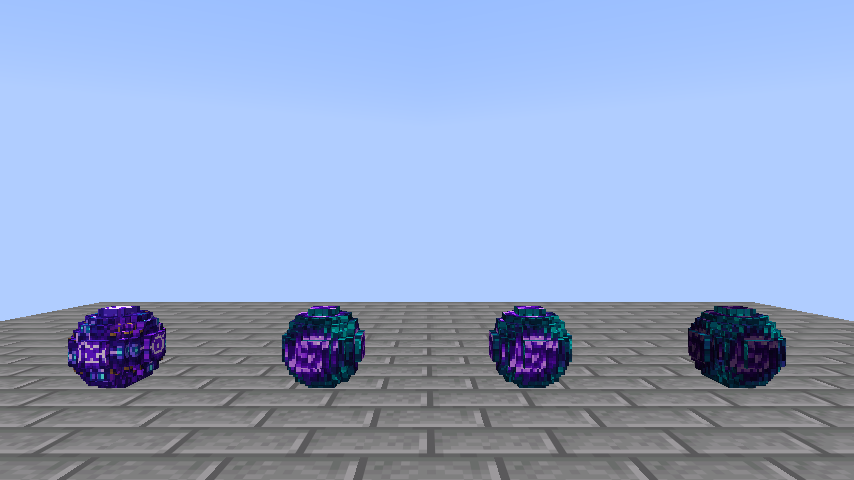
Actual Minecraft view: Nexus, two paired Portal Orbs, and an unlinked Portal Orb.