 Experience Works
Pipe transport and filtering
Wiki home · Feature index · Automation guide · Cross-mod interfaces

Existing glass Transport Pipe game asset. All tiers share the same pipe; the attachments provide the controls.
Connect inventories and configure a connection
Place Transport Pipes against the source/destination inventories, then hold an Extractor or Depositor and right-click the pipe or its touching inventory face. Sneaking is optional. When targeting a pipe with several free inventory connections, the closest free connected face to your click is used. Fittings cannot be placed as standalone blocks or onto a pipe with no adjacent supported inventory/machine/tank. Occupied, missing and protected connections give feedback rather than silently failing. Right-click the mounted attachment to open its settings. Right-click it with a Filter to install the filter.
Sneak-right-click an attachment to return its filter first, then the attachment. The settings screen also has a Remove filter button. Removed attachments retain their settings and ghost patterns; filters retain their item samples. Settings survive world reloads. Breaking a pipe drops its real in-flight item, attachments and filters; ghost patterns never become real drops.
Tiers and controls
| Tier | Extractor | Depositor |
|---|---|---|
| Infused | Existing Infused Extractor: 1 item per operation, 8-tick interval; redstone controls | Existing Depositor: redstone controls |
| Energetic | 16 items, 6-tick interval; exact matching and nearest/round-robin distribution | Energetic Depositor: exact matching and priority |
| Emblazoned | 64 items, 4-tick interval; can initiate complete batches | Emblazoned Depositor: previous controls, stock targets, overflow and batch patterns |
| Enderic | Faster extraction and stock-triggered crafting/processing | Enderic Extractor, Enderic Depositor, patterned Autocrafter |
An extractor's interval controls when it can attempt another operation. Ordinary items still travel through the glass pipe segments and can wait behind traffic. Fluids and electricity transfer transactionally when a route is available. All four attachment tiers are implemented.
Cycle buttons use left-click forward, right-click backward. Action buttons such as Remove filter use a normal left-click.
Redstone
Each attachment can ignore redstone, require a high signal, or require no signal. The signal is read at the pipe block. An inactive extractor stops taking new resources; items already travelling can finish. An inactive Depositor accepts nothing, so an item may wait or find another eligible destination.
Priorities, overflow and round-robin
Depositor priority ranges from −10 to +10, default 0. Higher priorities are tried first. Nearest eligible destinations are preferred within a priority group unless the source extractor has round-robin enabled.
Round-robin rotates eligible destinations of equal priority after successful dispatches. It does not bypass higher priorities. Distribution is by operation/batch, not a promise of equal final item counts when endpoints accept different quantities.
An Emblazoned Depositor can be marked Overflow only. Normal destinations are tried before overflow destinations; priority then orders each group. Full, filtered, disabled or unloaded destinations are skipped. Priorities, round-robin and redstone also apply to compatible fluid and electrical endpoints.
Type or exact matching
Energetic and higher attachments can match by item type or exactly by item components. Exact filters can distinguish enchanted equipment, custom names and potion contents. Filter ghost samples retain that data even when the attachment is currently matching only the item type.
For fluids, exact matching compares fluid identity and fluid data exposed by the sampled bucket/container. Ordinary fluid filters use bucket items. Fluids without a usable bucket can travel unfiltered but cannot be individually selected in that filter UI. Electricity ignores item/fluid filters.
Maintain stock from existing supplies
Choose Delivery: Stock on an Emblazoned Depositor. Place item samples into its nine ghost slots. The carried stack sets the initial desired amount without consuming the stack. Right-click a ghost with an empty cursor to select it; left-click with an empty cursor clears it.
The amount button adds one on left-click and subtracts one on right-click. The −64 and +64 buttons make larger adjustments. Targets are 1–4,096 items per entry by default. Each ghost displays its configured quantity. If an item is listed more than once, its highest target is used.
The Depositor counts matching items exposed by the destination connection and matching deliveries already in flight. For example, a target of 17 accepts only the shortfall; two extractors cannot each queue 17 more. If five items are consumed, five are replenished. It does not remove excess stock or craft missing items.
Stock and complete-batch modes are for items. Leave a connection in Normal mode for fluid delivery. Electrical transport is independent of these item modes.
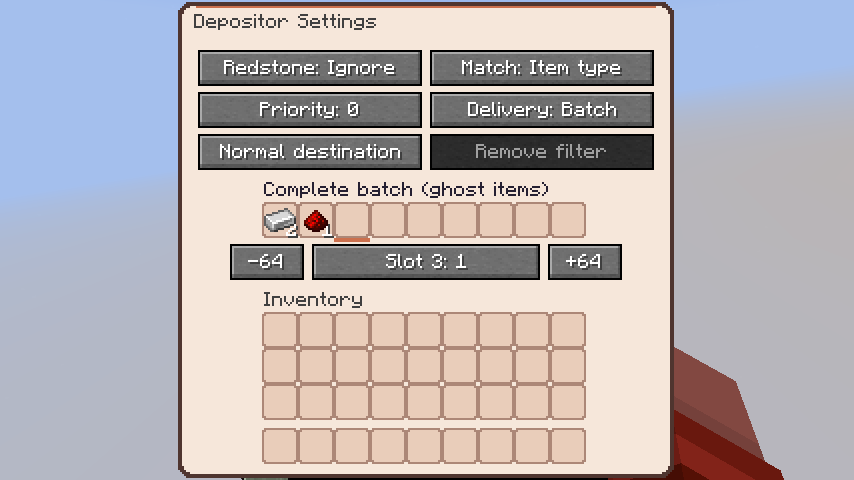
In-game settings screen: a complete batch of two iron ingots and one redstone, with separate player inventory slots.
Complete recipe batches
Choose Delivery: Batch on an Emblazoned Depositor. Its nine ghost entries describe ingredients and quantities, 1–64 per entry. Duplicate ingredients are combined. This is a delivery pattern, not a crafting recipe: it does not create outputs or request missing ingredients.
An active Emblazoned Extractor initiates delivery using existing supplies exposed by active extractor connections in the same loaded network. Source and destination filters and sided storage restrictions still apply. Ingredients may come from several inventories. No ingredient leaves storage unless the entire group can be extracted and the complete group fits in the destination.
The complete group is committed atomically. A brief item pulse marks batch activity; ordinary deliveries retain their moving item animation. Each contributing extractor receives a cooldown proportional to its contribution and its own batch size, so a large pattern does not bypass tier throughput. Lower-tier extractors may contribute, but cannot initiate a batch themselves.
After delivery, the connection waits until all matching ingredients from the previous batch have been consumed or removed before sending another batch. Unrelated items, such as a machine's power source, can remain in the destination. Matching is limited to storage exposed by the connected face.
Enderic: enable Craft missing supplies on a stock depositor to queue known patterns in a connected Autocrafter. Setup and persistence. Stock checks run every 40 ticks and count in-transit supplies and all enabled destinations.
Defaults, caching and compatibility
- Item batches/intervals: 1/8 ticks, 16/6, 64/4.
- Fluid batches: up to 1,000 mB per successful operation.
- Electrical batches: 1/16/64 standard energy, using the extractor interval.
- Ordinary pipe half-segment travel: 4 ticks.
- Loaded network search limit: 512 pipe blocks.
- Topology cache lifetime: 20 ticks, invalidated when pipe connections or settings change. Contents and redstone are checked live. At most 256 origin graphs are cached per world.
- Missing/blocked batch retry: 20 ticks. A destination waiting for a previous batch is rechecked within 4 ticks.
Tune pipes.route_limit, pipes.half_segment_ticks, pipes.network_cache_ticks, pipes.batch_retry_ticks, pipes.max_stock, and existing per-extractor batch/interval settings. No compatibility XP surcharge is added. Routes do not force chunks to load.
Public Fabric item/fluid interfaces and bundled Team Reborn Energy support API-only modded inventories, tanks and batteries. Known Doppelchest and double-chest aliases share their underlying stock identity. In-flight deliveries are rechecked at arrival, so an unexpected change/full destination cannot cause overstocking or item loss.
Sources
Pipe state and animation · Routing, stock and batches · Attachment settings · Menu · Filters · Integration test
Wireless pipe sections
Wireless Pipe Links connect already-loaded glass pipes for items, fluids and electricity, and also extend storage/controller discovery. Sneak-use the receiving pipe to bind, then mount on a sending pipe face. Links are one-way; install a return link for two-way routing. Default range 1,024 blocks in one dimension, with the binding player online. Empty-hand use opens redstone settings; sneak-use removes the fitting. No added XP/energy cost or forced chunk loading.
The old standalone Extract Pipe and Deposit Pipe blocks and their conversion recipes have been removed. Use Transport Pipes with Extractor/Depositor attachments.
Which connector to use
Transport Pipe bodies are shared by tiers; attachments supply tiered behaviour. Pipes visibly join crafting terminals and Autocrafters. Storage Connector fittings add a wired inventory to Emblazoned/Enderic combined storage. Remote Storage Connectors add a bound inventory wirelessly for Enderic terminals. Wireless Pipe Links bridge two pipe clusters, allowing normal routing and network discovery. Direct adjacent storage can be used without connectors. Playable examples and pairing steps.