 Experience Works
Autocrafting and processing jobs
Wiki home · Combined crafting storage · Pipes
Enderic crafting storage can now create requested items, craft intermediate ingredients and send complete processing batches to connected machines. Jobs run in a placed Autocrafter, which holds up to 18 Crafting Patterns. Manual crafting and the previous three pipe tiers retain their existing behaviour.
Set up a workshop
- Place an Enderic Crafting Table and accessible storage. Put an Autocrafter next to the table, or next to a glass pipe connected to it.
- Craft a Crafting Pattern. Use it in the air to open its ghost editor. Pick up an ingredient stack from your inventory and click the input squares to copy it. Your actual items are not consumed. Click a ghost with an empty cursor to clear it.
- For crafting, arrange a normal 3×3 recipe. The server computes the output; crafting ingredients are one per occupied square. Install the pattern in the Autocrafter.
- Install intermediate patterns too. For sticks from logs, teach logs → planks and planks → sticks. Recipes use the exact item variants saved in their patterns. If several installed patterns make the same exact output, the first matching pattern in workshop order is used; arrange cards accordingly.
- Open the Enderic table or its linked portable. Patterned items appear in storage even when none are stored, marked +. Select an item, enter a quantity, then choose Preview or Craft.
Preview lists raw ingredients as available / required (availability probes up to 16,384 items per ingredient), with missing supplies highlighted. Queueing a request with missing ingredients makes it wait; it does not conjure those ingredients. Recipe loops, excessive plans and unknown output patterns are rejected or reported. Output quantities round up to whole recipe batches, with extras returned to storage.
Jobs shows your requests, processing status and completed dependency steps. Cancel a job there, or use Cancel mine in its Autocrafter. Pause/Resume in the Autocrafter pauses its queue. Closing the interface does not cancel work.
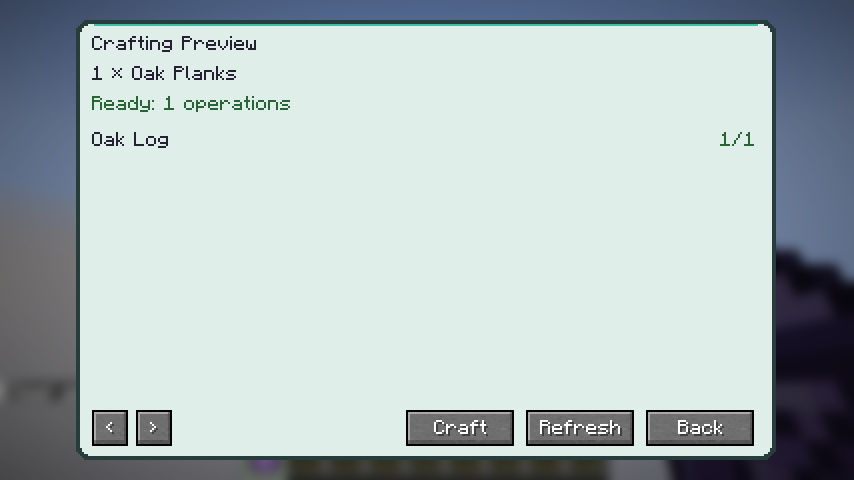
In-game request preview. Recipe batches may produce more than the requested minimum.
Machine processing patterns
Sneak-use a pattern on the desired machine input face, then use the pattern in the air. It now edits a processing batch: nine input and nine expected-output ghosts. Ghost counts are copied from your carried stack, up to 64 each. The output-face button selects the side from which outputs can be collected. Crafting clears the processing link and returns to ordinary recipes.
Declare every output you want collected, including secondary products and returned containers. Processing never creates those items itself: it waits for the actual machine to produce them. The target must be adjacent to the Autocrafter or joined to it by already-loaded glass pipes, in the same dimension. Wireless Pipe Links can bridge sections of that network. The bound input and selected output faces must expose compatible item storage. This supports the mod's machines and external Fabric Transfer API item machines.
Keep processing machines dedicated to their patterns. Clear pre-existing declared outputs before starting. The system reserves one machine for one dispatched batch, sends all batch inputs together or none, then collects its declared outputs before starting another batch. Machine reservations persist through unloading and saving. Configure fuel, XP/power crystals, electricity and any machine settings normally; the Autocrafter does not bypass operating requirements. For example, supply furnace fuel through another face and bind the ore pattern to its top input.
When cancelled after dispatch, a job finishes collecting that real batch before returning its buffered items. An unloaded or disconnected machine pauses the job. If the machine is destroyed, resources already inside follow that machine's normal drop behaviour; cancel the blocked job to recover its remaining reserved inventory. Undeclared outputs remain in the machine for normal extraction.
Enderic stock maintenance
Upgrade an Enderic Extractor and Enderic Depositor from their Emblazoned counterparts. Place an extractor on a source inventory. In the depositor settings, select Stock and enter its ghost items and quantities, then enable Craft missing supplies.
The depositor remembers the player who mounted it. Every 40 ticks it checks that player's accessible network, existing stock and items already in transit. It requests missing supplies from installed patterns, with one pending request per exact item in the discovered workshop. Multiple destinations for the same item contribute to the total desired stock; aliases of the same inventory are counted once.
Completed stock jobs feed accessible extraction inventories. Pipes then distribute results using their normal stock limits, priorities and filters. If no source inventory can accept the results, the job keeps them in its buffer. This avoids dumping a whole crafted batch into one destination and exceeding its target.
Persistence, limits and recovery
Raw ingredients are reserved transactionally into the job's real internal inventory before crafting starts. Competing jobs cannot spend those same items. Crafting consumes real ingredients, validates the current server recipe, retains recipe remainders and returns results to storage. If storage fills, items remain buffered and the job waits. Cancellation returns unused ingredients, completed intermediates, outputs and containers; it cannot turn completed crafting back into raw resources.
Job queues, exact patterns, processing state and reserved items are saved with the Autocrafter. Breaking it drops its pattern cards and buffered real items. Pending external-machine items remain in that machine. Jobs pause while their owning player is offline, the workshop/controller/machine is unloaded, permissions are unavailable or required connections are broken. No chunks are force-loaded. Reconnecting resumes eligible work.
| Default | Value |
|---|---|
| Pattern cards per Autocrafter | 18 |
| Jobs per Autocrafter | 8 |
| Worker interval | 8 ticks; one round-robin job turn |
| Requested quantity | 1–1,024 |
| Reserved inventory per job | 256 stacks |
| Dependency depth / steps / total operations | 32 / 512 / 4,096 |
| Stock-request check | Every 40 ticks |
| Autocrafter XP/electricity cost | None; external machines retain their own costs |
Configurable defaults include autocrafting.interval_ticks, autocrafting.queue_limit, autocrafting.max_request and autocrafting.stock_check_ticks; Enderic extractor batch size and fitting intervals also have individual pipe tuning keys. Content and feature.autocrafting can be disabled separately. Plans exceeding reservation capacity should be split into smaller requests. The catalogue displays up to 512 distinct patterned outputs and the job screen up to 64 active requests belonging to its viewer.
Planner · Worker and persistence · Requests and stock maintenance
See the Autocrafting Workshop example for a ready-built local setup with installed patterns and supplies.
Pattern editor controls
Blank Crafting Patterns stack to 64. Editing separates one card; encoded cards stack to one. The mode button toggles Crafting/Manual; Manual input and return ghosts support wheel counts (1–64). Manual expected returns never create items directly: bind the card to the real machine's input face before installing it. Sneak-use air clears; deleting every ghost also restores a blank card after closing.
The updated workshop includes real wired-storage, remote-storage and wireless-pipe examples. Directly adjacent inventories/controllers need no remote connector.
Smelting Stock Workshop demonstrates raw-ore grinding, alloy crafting, shared furnace processing, Mini Coal fuel stocking and four product stock targets.
Stock-target quantities in pipe settings draw as native item decorations so they remain above their target icons and below cursor-held items.
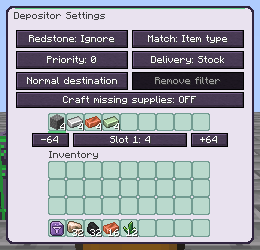
In-game screenshot: stock quantities drawn over their own item icons, below the carried-item layer.