 Experience Works
Combined crafting storage and portable links
Wiki home · Crafting guide · Recipe Tree
| Table tier | Accessible storage | Inventory limit | Remote Crafting Table link reach |
|---|---|---|---|
| Infused | One accessible adjacent inventory | 1 | Any loaded target, including other dimensions |
| Energised | All accessible adjacent inventories | 6 | Any loaded target, including other dimensions |
| Emblazoned | Adjacent inventories plus wired Storage Connectors on connected glass pipes | 64 | Any loaded target, including other dimensions |
| Enderic | Wired storage plus Remote Storage Connectors | 256 | Any loaded target, including other dimensions |
Tables use their own tier and lower-tier mod chests. Vanilla inventories and compatible Fabric Transfer API item storage also work, respecting exposed sides, chest locks, blocked vanilla chest lids and interaction permissions. Double chests and linked Doppelchest aliases count the underlying inventory once. Other mods control which storage views their APIs expose.
The right-hand panel combines exact item variants into totals, with 56 icons per page. Plain search matches item names/IDs. Metadata uses @mod, #tag, type:, colour: or category:; all prefixes also work here. Sort by name, count or mod. Different components remain separate entries.
- Left-click a stored item to withdraw up to one stack to your cursor; right-click withdraws one.
- Shift-click a stored item to withdraw a stack into your inventory.
- Click the storage panel with a carried stack to deposit it; right-click deposits one. Shift-click an item in your inventory to deposit it.
- Deposits prefer higher-priority connectors, then existing matching stacks, inventories containing that item, and other available space.
- Recipe Tree's green tick and the Recipe Tree book draw ingredients across connected inventories. Shift-click the tick fills the largest craftable batch.
- Closing returns remaining grid ingredients to accessible storage before your inventory. No XP cost.
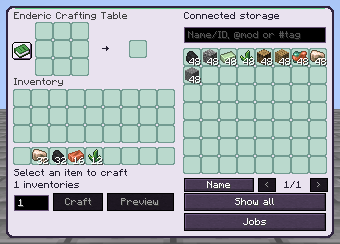
Current-build test view: an attached Enderic chest catalogued beside the crafting grid.
Connectors
Storage Connector: sneak-use an inventory face with a glass Transport Pipe directly outside that face. Emblazoned and Enderic tables discover the connector through pipes connected to the table. It exposes storage without moving items by itself. Use the fitting with an empty hand to configure redstone and priority; sneak-use with an empty hand removes it, retaining its settings.
Remote Storage Connector: sneak-use an inventory face to bind, then sneak-use a free face of a glass pipe to mount. Enderic tables can access its bound inventory. Sneak-use the unmounted item in the air to clear the link. Default maximum distance is 1,024 blocks from the placed crafting table, in that table's dimension. Inventories must already be loaded; connectors do not load chunks. An unavailable link is shown as offline. Replacing a linked mod chest requires relinking.
Wired networks scan at most the configured pipe route limit. Inventory scans are bounded to 65,536 views, refreshed every 10 ticks by default; actions revalidate current access. The panel reports an exceeded scan/inventory limit. Redstone-disabled connectors are omitted. Storage connectors do not accept item filters; use priorities and exposed inventory sides to control access.
Portables and progression
The Basic Portable Crafting Table is a standalone 3×3 grid. Upgrade it with Endium materials and an Ender Pearl into a Remote Crafting Table. These are the only two portable variants.
Sneak-use the Remote Crafting Table on any tier of the mod’s placed crafting tables to link. Use in the air to open the linked workspace; sneak-use in the air to clear the link. Links work across distances and dimensions if the target is already loaded. The placed table determines the available storage and autocrafting features. Neither portable charges XP or loads chunks.
The placed tables retain their Infused → Energised → Emblazoned → Enderic progression. Enderic workspaces support autocrafting jobs and stock maintenance through installed patterns and Autocrafters.
Recipe Tree bookmarks
The recipe-book button opens Recipe Tree with Browse items above search and independent Ready/Saved checkboxes below. Neither shows all items; both show ready bookmarks. Saved items use the same bookmarks as the full browser. Hover to preview; left-click fills one craft, Shift-left-click fills the maximum batch, right-click opens uses, and R-click opens recipes. Ctrl-left-click requests missing craftable ingredients on Enderic terminals. See Recipe Tree for all controls.
Connected-storage craftable filter
Enderic workspaces have a three-way button below the storage sort/page controls: Show all displays stored resources and known pattern outputs; Craftable only displays items with known patterns; Hide craftable displays stored resources only, hiding craftable-only + entries while retaining real stock even if that item also has a pattern. This is separate from the book’s Ready checkbox, which checks whether ingredients are currently available. Pattern visibility does not guarantee enough resources to complete a request.
Deep Storage Barrels already join the combined inventory through ordinary adjacent storage/Inventory Connectors; no second drawer network is required. Remote targets are checked against team chunk claims. Existing Backpack Modules, Mining Bags and Tool Bags remain the carrying progression.