 Experience Works
Nexus Portal Orb
Wiki home · Item index · Travel, maps, and dungeons
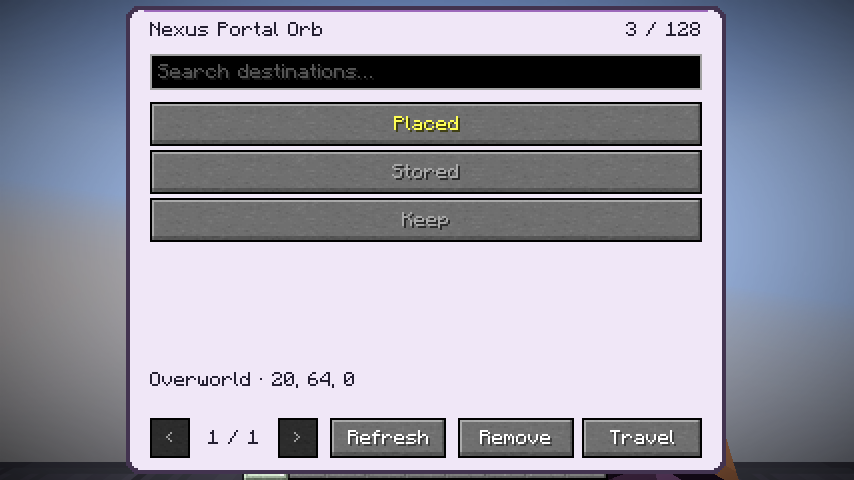
In-game destination list showing named Portal Orbs, an unplaced destination, search, Remove, and Travel buttons.
A placeable hub for many Portal Orbs. Registered orbs return to the nexus; the nexus lets you choose which placed orb to visit. Routes work between dimensions and cost 0 XP.
Crafting
Put an unused Pocket Planet in the centre of a crafting table, surrounded by 8 unused Portal Orbs, to craft 1 Nexus Portal Orb.
OOO
OPO
OOO
O = Portal Orb, P = Pocket Planet (the basic cobblestone variant).
A planet already bound to a world or a Portal Orb already linked to a route cannot be consumed by this recipe.
Controls
- Sneak-right-click a block with the nexus item to place it.
- Hold an unused Portal Orb and right-click the placed nexus without sneaking to register that orb. The item remains in your hand.
- Sneak-right-click at your destination to place the registered Portal Orb. Right-click it with an empty hand to return to the nexus.
- Right-click the placed nexus with an empty hand, select a destination, and click Travel to go there.
Rename a Portal Orb in an anvil before registering it to give its list entry a custom name. Otherwise entries are named Portal 1, Portal 2, and so on. Names are remembered by the network.
The list supports search by name, dimension, and coordinates, plus pages of 5 destinations. Hover an entry or select it to see location details. Unplaced orbs remain listed in grey, with Travel disabled. Use Refresh to update the list after another player places or moves an orb. The server checks that the actual destination still exists when you travel.
To unregister a destination, select its entry and click Remove. This works for placed and unplaced orbs, removes the entry immediately, and disconnects both directions of that route without breaking the orb. Other destinations keep working. The old Portal Orb can be registered with a nexus again or paired normally. For an orb already placed in the world, use another unused Portal Orb on it to create a normal pair, or pick it up to register it with a nexus.
Cancellation is saved even while an orb is in an inventory or its chunk is unloaded. Its old link is cleared when the orb is next used or its placed endpoint is accessed; a stored item's tooltip may still say linked until then. Removed routes cannot revive after restarting the world.
Moving and safe travel
Breaking a nexus drops its item with its network identity. Replacing it moves the return destination for all registered orbs. Breaking a registered normal orb preserves its link, and replacing it updates its location in the nexus list. Travel is unavailable while either required endpoint is not placed.
The nexus uses the same safe-landing checks as ordinary Portal Orbs: there must be a supported, unobstructed, non-hazardous spot within 3 blocks of the destination. Leave standing room beside each orb. Duplicate placed copies cannot share the same network endpoint. Existing normal two-orb pairs continue to work separately; already paired orbs cannot also register with a nexus.
Defaults and configuration
| Setting | Default |
|---|---|
| Registry ID | experience_works:nexus_portal_orb |
| Travel cost | 0 XP |
| Destinations per nexus | 128 |
| List rows per page | 5 |
| Travel-button use distance | Within 8 blocks of the opened nexus |
| Safe landing search | 3 blocks from destination |
| Light level | 10 |
nexus_portal.max_connections=128 in experience-works-tuning.properties accepts 1–1024. Restart to apply it. content.nexus_portal_orb=false or disabling the travel module disables this content. Networks and labels are stored with the world and survive closing Minecraft.
Network storage · Menu and validation · Travel checks · Block and drops
Appearance
The orb is a stand-free stepped sphere with gentle bobbing, matching its held and inventory model. Portal Orbs have teal shells and a purple paired-link glyph; placed unlinked orbs show a dim glyph and linked ones brighten. The Nexus has a violet hub-and-destinations pattern. Brightness indicates a stored link, not guaranteed destination availability; travel still checks the endpoint and safe landing.
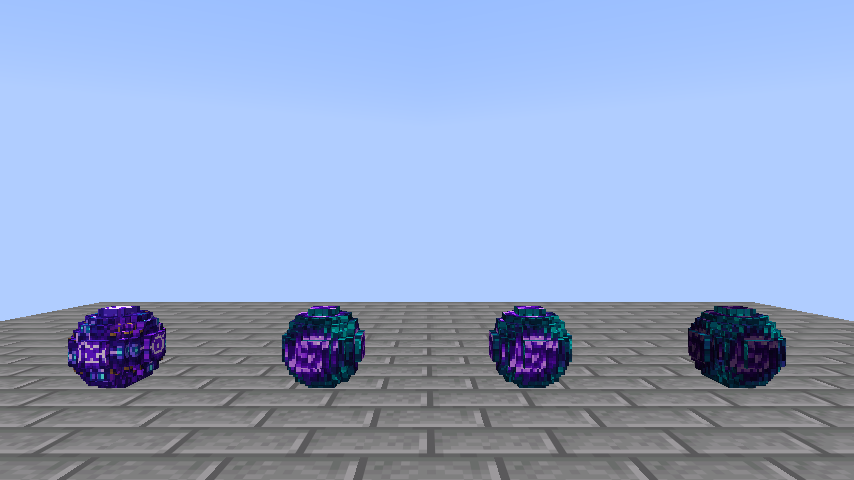
Actual Minecraft view: Nexus, two paired Portal Orbs, and an unlinked Portal Orb.