 Experience Works
Recipe Tree
Wiki home · Controls · Creative catalogue
Press R while in the world to open Recipe Tree. Its first landing view is a large searchable item catalogue. The item grid adapts to your window and becomes a side panel when a recipe is open. Recipes from a crafting table appear before other station types.
In an inventory, hover over an item and hold R for its recipe preview, or R + Shift for uses. R + left-click opens recipes; R + right-click opens uses. Inside the full Recipe Tree browser, left/right-click item icons without holding R to follow recipes/uses, including while Shift is held. The compact crafting-book panel instead uses plain left-click for recipe placement, as described below.
Search, navigation and memory
Search is focused when the GUI first opens. Click anywhere outside its search bar to stop typing into it; click inside to reactivate it. Plain search matches only item names and registry IDs, using case-insensitive substrings. Tags, mod display names, categories, types and inferred colours are searched only with an explicit prefix. Page arrows and scrolling browse the item panel.
Search prefixes
| Query | Searches |
|---|---|
lava |
Item name or full registry ID only |
@minecraft or mod:minecraft |
Mod ID or display name |
#logs or tag:logs |
Item tags and block tags |
type:tool |
Indexed item type: block, machine/automation, tool, weapon, food, armor/armour |
colour:purple or color:purple |
Indexed colours |
category:building |
Creative-tab category names and IDs |
name:stone |
Display name only |
id:minecraft:stone |
Registry ID only |
all:lava |
All indexed fields, opting into the former broad search |
Combine terms with spaces; every term must match. Quote multiword values: @"Experience Works" type:tool pickaxe or name:"stone pickaxe". A normal ID such as minecraft:lava_bucket also works without an id: prefix. Empty searches show all entries. Plain colour words are name/ID substrings, so red can match Redstone; colour:red uses the indexed colour field instead.
The same syntax is used by the full browser, compact crafting book, Saved/bookmark lists, Cheated Recipe Tree and connected storage. Hover a search field for a short syntax reminder. Colours and types use item metadata and existing mod colour rules, not image analysis.
The back button and Backspace return to the previous recipe or item landing view. Backspace edits text while a nonempty search is focused; click outside first to use it for navigation. With an empty search it can navigate immediately. Browse items returns to the full catalogue. Station and recipe arrows cycle through available alternatives.
The last search, item/recipe, station, recipe page and Saved filter are remembered when reopening the GUI. Bookmarks and navigation are saved separately for each world or multiplayer server. Single-player data lives in that world’s experience-works-recipe-tree.json; multiplayer data uses a server-specific file under config/experience-works-recipe-tree/. The old global file is left untouched and is not imported into every world; normal item registry data preserves variants such as potions. Unknown removed items are skipped on load.
Bookmarks and missing ingredients
Middle-click an item icon to add/remove an item bookmark. The star button bookmarks the currently inspected item. A gold corner marker identifies bookmarked items. The Saved checkbox beside the search bar restricts the catalogue to these items; uncheck it to browse all items again. Search applies in either view; left/right-click opens recipes/uses. Bookmarks are item targets, not an automatic crafting queue.
For crafting recipes, hover over the tick or recipe arrow to tint missing ingredient squares red. Availability is checked on the server using the current inventory, crafting grid and eligible connected storage, with overlapping alternatives allocated across recipe slots.
Middle-click a grey tick or grey recipe arrow to bookmark missing ingredient items. This does not consume ingredients or craft anything. Ingredients represented by tags use a representative matching item. Repeated missing copies are kept as one item bookmark. Local bookmarks are limited to 1,024 items.
Fill a crafting grid
When opened from a crafting inventory, the tick turns green if the server finds enough materials and the recipe fits the current grid. Click to arrange one batch; Shift-click a green tick fills the maximum available batch. Take the crafting output normally. In the world browser, the tick remains inactive for placement; open a crafting interface to use recipe transfer.
Vanilla tables, the Basic Portable Crafting Table and unlinked Remote Crafting Tables use inventory/grid ingredients. Tiered crafting tables and linked Remote Crafting Tables also use their eligible combined storage. The player's 2×2 grid can only transfer recipes that fit it. The server rechecks ingredients before moving them. An occupied cursor or insufficient space to return current grid ingredients can prevent placement.
Crafting arrows and furnace/grinder progress bars open Recipe Tree directly, including when idle. Machine pages browse recipes; the fill tick supports crafting and native furnace recipes when opened from a matching inventory.
No item, recipe, XP cost or durability is required for normal Recipe Tree. Its world hotkey can be remapped in Minecraft's controls. Browser · Local navigation/bookmarks · Ingredient allocation.
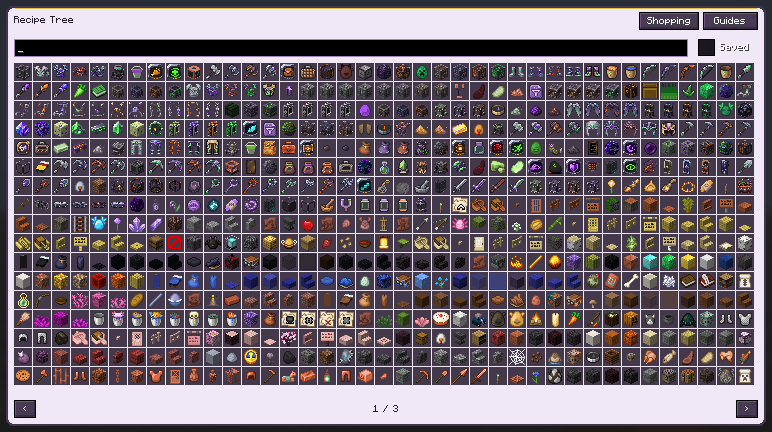
In-game screenshot: the expanded item catalogue on the landing page.
One crafting book
The Minecraft recipe-book button now opens the compact Recipe Tree panel. This replaces the separate bookmark sidebar in vanilla crafting tables, the player’s 2×2 grid, mod crafting terminals and portable crafting tables. Furnace, blast-furnace and smoker books use the same panel with their own recipes. Recipes include synchronized modded recipes rather than only unlocked vanilla entries.
- Browse items sits above the full-width search bar. Ready and Saved checkboxes sit side by side below search. Ready starts checked on first use, then remembers your choice for this world/server. There are no Recipes/Saved or Mods tabs; use
@modin search to filter by mod. - Neither checkbox: all catalogue items, filtered by search. Ready only: items with a recipe usable at this station and ingredients available now. Saved only: bookmarked items, including items not craftable here. Both: saved items that are ready to craft at this station. Search applies to every combination. Final availability and transfers are checked by the server.
- Hover an output to preview ingredients in empty grid slots without modifying items. Existing items remain visible. Green means available, red means missing, purple means requestable through Enderic autocrafting. Moving away clears the preview. Availability tint is a slot background below ghost icons, existing items, item counts and the carried stack.
- Left-click a ready item to fill one craft without leaving the interface. Shift-left-click fills the largest batch allowed by available ingredients and slot stack limits. Missing ingredients leave the real grid unchanged. Right-click opens uses; R/Shift+R hover previews and R-click recipe browsing remain available. Ctrl-left-click requests missing autocraftable ingredients on eligible Enderic terminals. Middle-click adds/removes a bookmark.
- Browse items opens the full browser, with the same bookmarks and search. Use its green tick for one batch or Shift-click the tick for the maximum batch. Furnace transfer fills the ingredient slot; fuel remains separate.
The compact panel matches the terminal tier palette. At narrow window sizes the book temporarily occupies the crafting view, like Minecraft’s book. There is no second star sidebar to overlap it.
Opening Recipe Tree through R or R+Shift leaves search unfocused so held keys cannot insert repeated characters. Click inside search to type; click outside to stop typing.
Filling first returns the current crafting grid to attached storage, then to player inventory. Without sufficient return space the operation aborts without deleting ingredients. Hovering never changes the real grid.
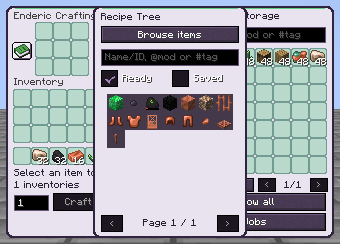
Current-build capture of the unified book and Enderic connected-storage interface at a compact window size.
The compact recipe-book panel matches the height and vertical alignment of its hosting inventory, including vanilla crafting/furnaces and each mod terminal tier. Its visible item rows adapt to that height.
The compact book search accepts typing after clicking it and releases focus when clicking outside. Hold R over a book item for its recipe preview; Shift+R shows uses, matching inventory tooltips. Ghost ingredients draw in empty slots using the crafting grid’s local coordinates. Tint renders before real slots; occupied slots keep their actual item icons/counts. The footer displays a plain, unshadowed Page X / Y counter.
Non-mirrored Tool Rod and stone-tool recipes retain their shaped dimensions during automatic placement, including empty pattern cells. Their placement matches the preview in both 2×2 and 3×3 grids.
When Recipe Tree is open over the world map, the background map does not handle mouse hover/clicks, scrolling or keys, and does not display map-cell tooltips.
The Cheated Recipe Tree now uses this same browser with an inventory panel below it. Left-click gives one item, Shift-left gives a stack, right-click navigates uses, R-left navigates recipes and middle-click bookmarks. Server possession checks still apply.
Acquisition information
Click Sources in an item’s full browser view to see Drops, World Generation, Gathering and Trading / Rewards. Top arrows change category; lower arrows change source; scroll the left card for conditions. Click Recipes to return to the normal recipe view. Information comes from server loot/feature/trade data plus labelled mod defaults; conditional results are not guaranteed percentages. Coverage, controls and integration guide.
Guide packages
Guides opens the generic guide reader, with mod-supplied books, chapter filtering and article search. Guide on an item’s page opens its associated article when one is available. Item icons link back to recipes/uses. Experience Works currently supplies 30 wiki-backed articles and three workshop tutorials. Guide controls · Provider format.
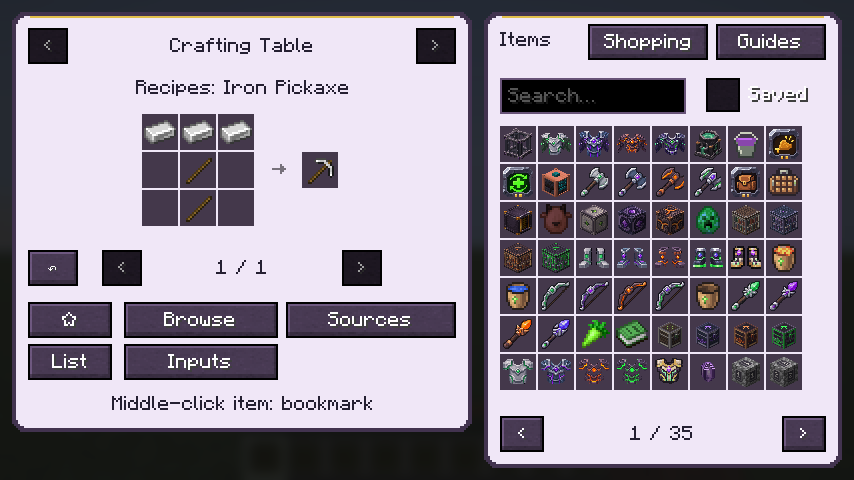
The bookmark hint has its own line below the List and Inputs buttons; compact headers shorten to avoid overlapping controls.